Oracle E-Business Suite (EBS) R12 is a powerful ERP system widely used across industries. After a successful installation, one common requirement is connecting the Oracle EBS database with Oracle SQL Developer for easier database management, querying, and development tasks.
In this guide, we'll walk you through how to connect Oracle EBS R12 with Oracle SQL Developer — the exact steps, potential issues, and best practices.
Why Connect Oracle SQL Developer to Oracle EBS R12?
Oracle SQL Developer provides a simple, intuitive GUI to interact with Oracle databases. By connecting it to your EBS R12 database you can:
- Run SQL queries on EBS schemas (like AP, AR, GL, etc.)
- Perform database administration tasks
- Browse tables, views, packages, and more
- Increase your productivity compared to using only SQL*Plus
Pre-Requisites
Before you start, make sure you have your database host, port (usually 1521), service name, and credentials ready.
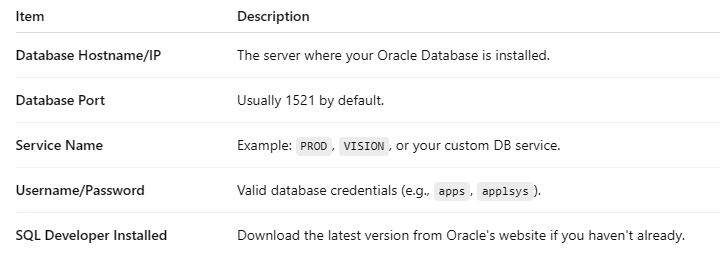
> Important: You are connecting to the Database Server, not to the EBS Application URL (http://apps.example.com:8000).
Step-by-Step Guide
Step 1: Launch Oracle SQL Developer
Open SQL Developer on your machine. If it's your first time, you might need to configure a JDK path.
Step 2: Create a New Database Connection
Click + or New Connection, then fill out the connection fields (name, username, password, hostname, port, and service name).
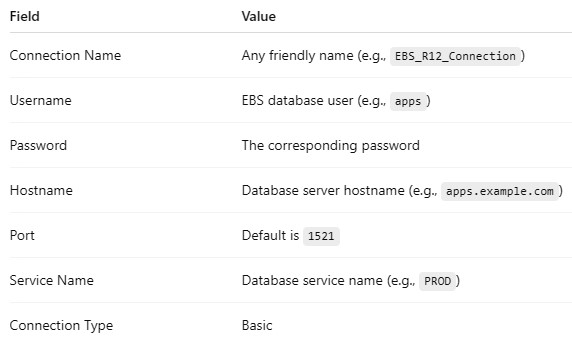
Step 3: Test and Connect
Click the Test button. If everything is correct, you'll see Status: Success. Click Connect to start working with your EBS database!
Common Issues and Troubleshooting
1. ORA-12541: TNS: No listener Cause: the Oracle Listener is not running. On the server, run:
2. ORA-12170: TNS: Connect timeout occurred
Cause: a firewall is blocking port 1521. Ensure the firewall allows incoming connections on port 1521.
3. ORA-12514: TNS: Listener does not currently know of service Cause: wrong Service Name entered. Confirm the correct Service Name using:
Bonus: Oracle EBS R12 Architecture in a Nutshell
-
🔵 EBS Apps Tier: handles web services (Apache, Forms, OACORE), accessed via a URL like
http://apps.example.com:8000.
-
🔵 EBS Database Tier: hosts the Oracle database, connected by SQL Developer on port
1521.
✅ SQL Developer connects directly to the Database Tier, not through the Application Tier.
Final Thoughts
Connecting your Oracle EBS R12 environment with Oracle SQL Developer greatly improves database accessibility and developer efficiency. Always ensure you have the right database credentials, service names, and open ports before attempting a connection.
✨ Pro Tip: Save your connection setup in SQL Developer for future reuse without re-entering credentials every time!
About the Author: gs_admin
A senior technical contributor specializing in architectural designs, software optimization, database structures, and developer education. Passionate about writing clean code and sharing engineering knowledge.